You’re spinning, the reels are filled, and all of a sudden you get a location error and your access is denied. No warnings, no reasons why, just an error message saying that your location can’t be validated. And if you’ve ended up here in your quest for solutions to how to fix social casino geolocation errors, you’re probably looking at that same message right now.
It’s an error that many players encounter; it’s almost never permanent, and it can usually be solved within five minutes.
What a Geolocation Error Actually Means
The social casinos and sweepstakes websites run on the basis of a “no purchase necessary” rule, meaning that the Gold Coins are used for gaming and the Sweeps Coins for entry into any prize contest that may take place at any given time. As the rules of sweepstakes change from one state to another, these websites are obliged to identify the location of any individual user by geolocation, which means identifying the location based on GPS, Wi-Fi, and IP.
A social casino location error simply means that confirmation failed. It doesn't mean you did anything wrong, and it doesn't mean your account has been flagged. It usually means one small technical thing between your device and the platform's location check got in the way.
Common Symptoms and Why Players Get Frustrated
If you've hit this wall, you've probably noticed one or more of these:
- A pop-up saying your location "could not be verified" right when you try to log in or load a game
- The app freezing on a loading screen instead of showing the error outright
- Being logged in fine on Wi-Fi but blocked the moment you switch to mobile data (or vice versa)
- The error appearing suddenly after weeks of normal play, with nothing on your end having changed
- Getting the message even though you're fairly confident you're in an eligible state
Benefits of a Proper Geolocation Fix
Before jumping into how to fix social casino geolocation errors, it helps to know why doing this the right way, rather than forcing your way past it, actually matters:
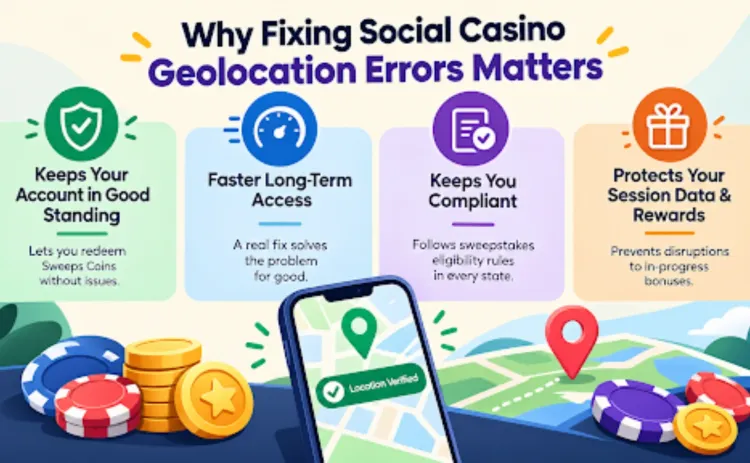
- Keeps your account in good standing. Legitimate location verification protects your ability to redeem Sweeps Coins later without complications.
- Faster long-term access. A real fix (clearing a cache, updating an app) solves the problem for good. A workaround like a VPN just delays the same error.
- Keeps you compliant with sweepstakes eligibility rules, which exist to keep the platform operating fairly across every state it's available in.
- Protects your session data and rewards, since some quick fixes (like force-closing an app mid-session) can interrupt in-progress bonuses if done carelessly.
Who's Most Likely to Hit This Error
Geolocation errors aren't random misfortune; they tend to cluster around a few situations:
- Players who travel frequently or switch between home Wi-Fi and mobile data often
- Anyone using a VPN, proxy, or "location-masking" browser extension, even for unrelated reasons
- Players near state borders, where GPS and cell-tower data can overlap between two states
- Users on older app versions or browsers that haven't been updated in a while
- People on shared or corporate networks, where the network's registered location doesn't match the player's actual location
If none of those apply to you and the error still won't go away, it's more likely a genuine eligibility question tied to your state than a technical glitch; more on that below.
Step-by-Step Fixes for a Location Verification Error
Here's the order that resolves this fastest, based on how often each cause actually turns out to be the culprit:
Turn off any VPN or proxy
This is the single most common cause. Even a VPN running in the background for an unrelated app can interfere with location detection.
Enable location permissions
- Mobile: Go to your device settings → Apps → find the Spinzy app → Permissions → Location → set to "Allow while using the app."
- Desktop browser: Click the lock icon next to the address bar → Site settings → Location → Allow.
Clear your browser or app cache
Old location data can get stuck and keep feeding the platform outdated information.
Temporarily disable ad blockers or privacy extensions
These sometimes block the scripts responsible for location verification.
Switch networks
If you're on Wi-Fi, try mobile data, or vice versa. Corporate and campus networks are especially prone to routing traffic through a different region.
Update the app or browser
Older versions occasionally lose compatibility with newer verification methods.
Try a different device
If the error only shows up on one device, that narrows the problem down fast.
Most players resolve their social casino geolocation errors within the first three steps.
Where the Fix Has Limits
Not every location error can be fixed through troubleshooting, and that's by design, not a flaw.
- If you truly are in a state where this sweepstakes model is not supported by your state's laws at all, no cache clearing or toggling of permissions can make any difference in that case.
- Hiding your location through the use of a VPN is not a proper solution, as it might affect the eligibility of your account. It is also not a solution to the problem itself; it only postpones it.
- Certain networks within corporations or schools block location-sharing at the network level, which is beyond the scope of any application settings.
If you've worked through the steps above and you're still stuck on how to fix social casino geolocation errors, it's worth checking whether the issue is technical or eligibility-based before trying anything else.
What to Expect After Fixing It
Once the location error fix works, verification typically happens instantly; there's no waiting period or manual review for most players. You should be able to log back in, pick up where you left off, and continue toward Sweeps Coins redemption without any lasting effect on your account history or rewards balance.
VPN Workarounds vs. Actually Fixing the Error
A lot of players consider a VPN a shortcut. Here's how that compares to solving the real issue:
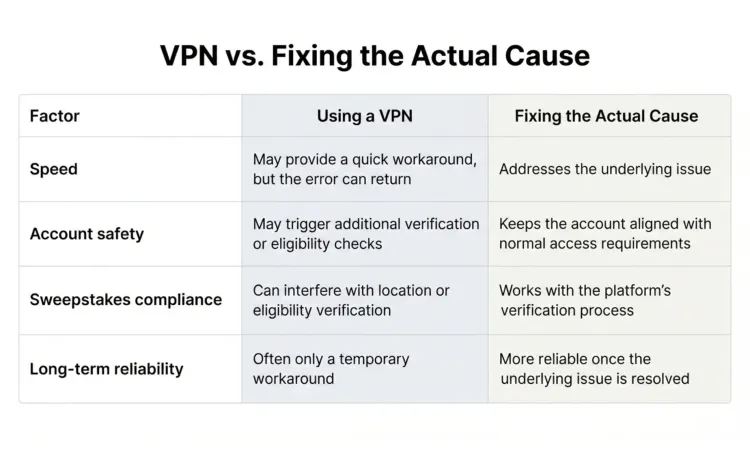
The takeaway is pretty clear: a VPN might get you back in for one session, but it's not solving anything; it's just postponing the same location verification error.
A Real-World Example
A player who plays regularly from home in an eligible state but ran into a location error the one week he was traveling for work and connecting through his hotel's Wi-Fi. The hotel’s network was registered to a data center located in another state, completely messing up his verification process.
He logged in using the data from his mobile connection rather than the hotel Wi-Fi, and the problem disappeared right away without the use of any proxy. It's a good reminder that most of these errors trace back to something as simple as which connection you happen to be using at that moment.
Final Thoughts on Fixing Social Casino Location Errors
The geolocation problem in social casinos is far scarier than it really is. For the most part, it is either a faulty Virtual Private Network connection, outdated cache, incorrect permissions, or simply a different network, everything that you can solve on your own within minutes without any external help. The only situation when that does not apply is the one when your real location is outside the jurisdiction for sweepstakes.
Once you’re back to playing on Spinzy, you should be aware of the fact that the code Spinzy7 gives an additional 7% on both Gold and Sweeps Coins if you choose to get any of the coin packages, just a little reward for those loyal players after the glitch is solved.
Ready to get back to playing? Explore Spinzy’s guide to the best payout online slots games and discover more games to try once your location verification is sorted.
FAQs
1. Why does the sweepstakes website even need to know my location?
Eligibility for sweepstakes is established on the state level; websites must validate players' locations before letting them enter any games or collect their prizes. It is necessary for compliance purposes and is not just an individual issue.
2. Does a location error mean my account has been banned or flagged?
No. A geolocation error is a technical verification issue, not a penalty. It doesn't affect your account standing, coin balance, or play history.
3. Can I use a VPN to get around a location restriction on Spinzy?
It's not recommended. VPNs interfere with accurate location verification and can create eligibility issues rather than solve them. If a VPN is active for any reason, turning it off is usually the first step to resolving the error, not adding one.
4. What if the problem persists even after performing the above simple steps?
If you have turned off your VPN, turned on location services, or changed your network, but the problem still persists, then you might consider contacting the customer service team, as there is a possibility that this is connected with state-wise eligibility.
5. How will I know if Spinzy is currently available in my state?
This may vary due to changes in sweepstakes rules across different states, and therefore the best possible answer would be the eligibility details that are provided on the Spinzy platform itself.
Authored and Validated by: A Sweepstakes Gaming Expert